
_5949de.png)
Julian Boiko won a dramatic qualifying match against his opponent from China
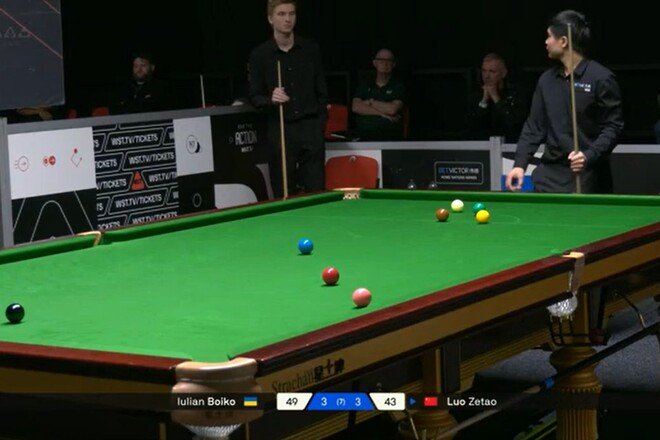
On September 13 at 3:00 p.m., Ukrainian snooker player Julian Boiko won his first-round qualifying match at the 2026 Northern Ireland Open.
The qualifiers are taking place from September 13 to 16 in Leicester, England, and the main part of the tournament is scheduled to be held in Belfast from October 18 to 25.
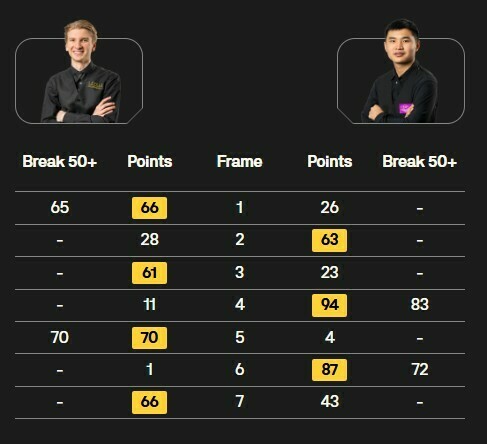
In the first round of qualifying (Q1), 20-year-old Julian Boiko (ranked 69th) defeated 25-year-old Chinese snooker player Luo Zetao (ranked 117th) with a score of 4–3. The match was dramatic.
Boyko took the lead three times, but his opponent tied the score each time. Julian made runs of 65 and 70 points, while the Chinese player responded with breaks of 83 and 72. In the decisive 7th frame, the Ukrainian won the battle for the last red ball and secured the decisive lead (4–3).
Yulian Boiko advanced to the second round of Q2, where he will face Ben Mertens of Belgium.
Two more Ukrainian snooker players will compete in the Northern Ireland Open qualifiers. In Q1, Anton Kazakov will play against Sam Craigie of England on September 13 at 6:00 p.m., while Mykhailo Larkov will face Canadian Sahir Nayyar on September 14 at 3:00 p.m.
Snooker. 2026 Northern Ireland Open
Q1 Qualifying. Leicester (England), September 13, 2026
Yulian Boiko (Ukraine) – Luo Zetao (China) – 4:3
Відповіді