
_5949de.png)
Antonelli won the Spanish Grand Prix
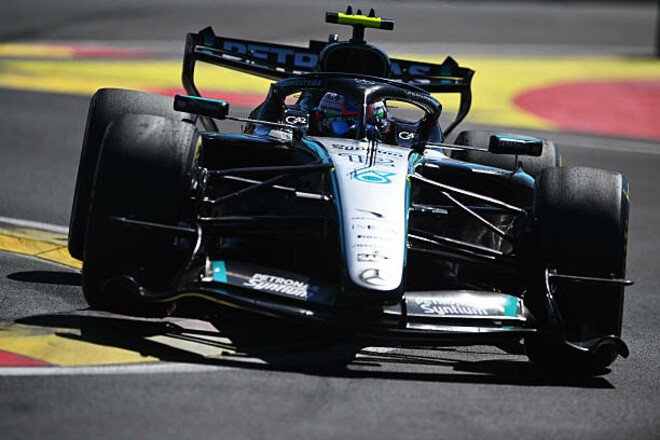
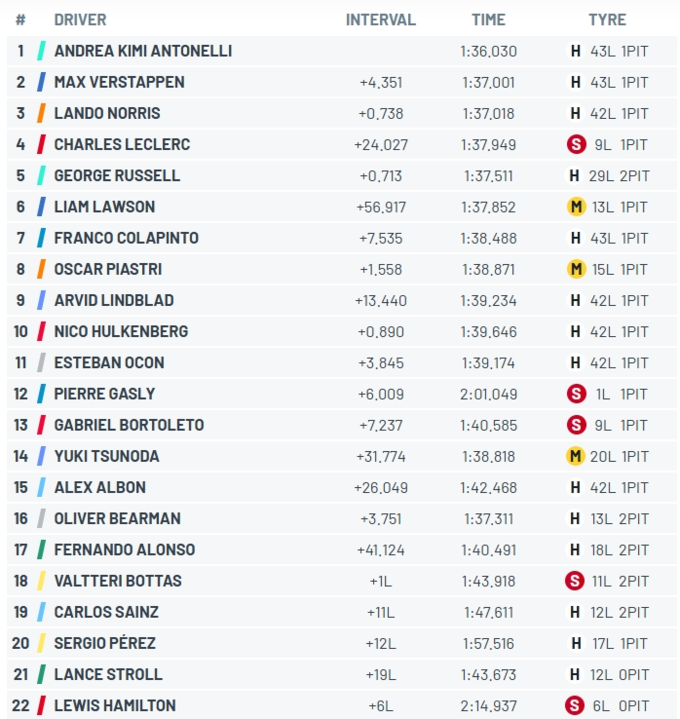
A Formula 1 street race took place in Madrid as part of the Spanish Grand Prix. Mercedes driver Andrea Kimi Antonelli took the win.
Max Verstappen in a Red Bull and Lando Norris in a McLaren finished on the podium.
Norris started from pole position and managed to hold off Antonelli, building a six-second lead, but the reigning champion’s run was derailed by a virtual safety car caused by Lance Stroll’s stop.
It was inconvenient for Norris to make a pit stop, and when he finally did so after his rivals had already pitted, there was a delay with the tire change, and Lando returned to the track in fifth place, losing all chances of victory.
The race didn’t go well for Ferrari: Lewis Hamilton retired due to technical issues, while Charles Leclerc finished fourth, even though he ran on a single set of tires and led for most of the race, making his mandatory tire change with nine laps to go (he didn’t wait for the safety car).
Colapinto, Lindblad, and Hülkenberg all managed to finish in the top 10.
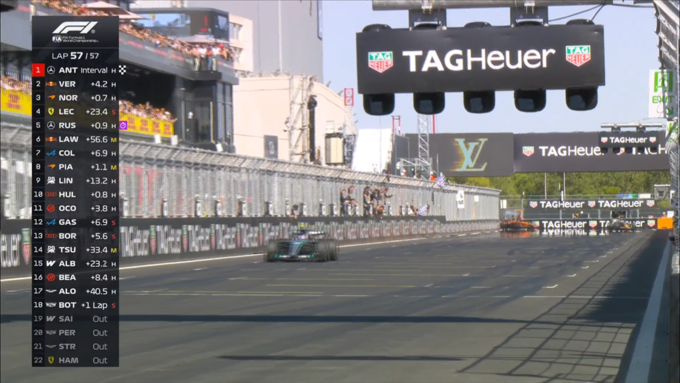
Overall Standings (Top 3)
1. Andrea Kimi Antonelli (Mercedes) – 292
2. George Russell (Mercedes) – 211
3. Lewis Hamilton (Ferrari) – 191
Spanish Grand Prix Results
Відповіді