Перейти до змісту
View in the app

A better way to browse. Learn more.

Файна Україна

A full-screen app on your home screen with push notifications, badges and more.

To install this app on iOS and iPadOS
  1. Tap the Share icon in Safari
  2. Scroll the menu and tap Add to Home Screen.
  3. Tap Add in the top-right corner.
To install this app on Android
  1. Tap the 3-dot menu (⋮) in the top-right corner of the browser.
  2. Tap Add to Home screen or Install app.
  3. Confirm by tapping Install.

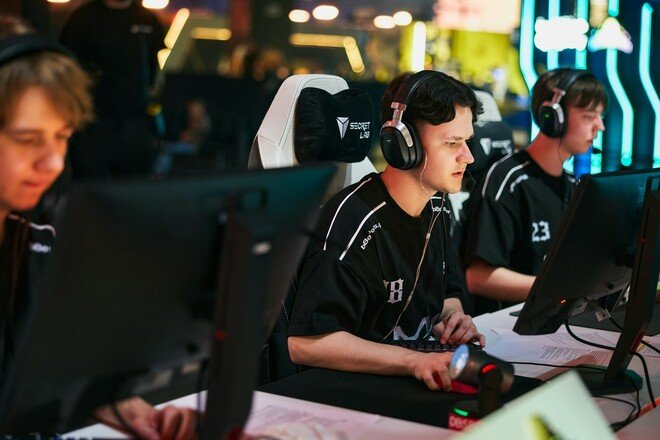
Two Ukrainian teams are one step away from the finals of the CS2 tournament in Poland
📅 20.09.2026 07:10⏱ 1 хв читання
Ciko Перегляди: 18 Відповіді: 0
Two Ukrainian teams are one step away from the finals of the CS2 tournament in Poland
B8 та Inner Circle дізнались своїх суперників у півфіналах Logitech G Play Connect 2026

All the semifinalists have been determined for the Logitech G Play Connect 2026 tournament, which is taking place in Poland and features a $100,000 prize pool.

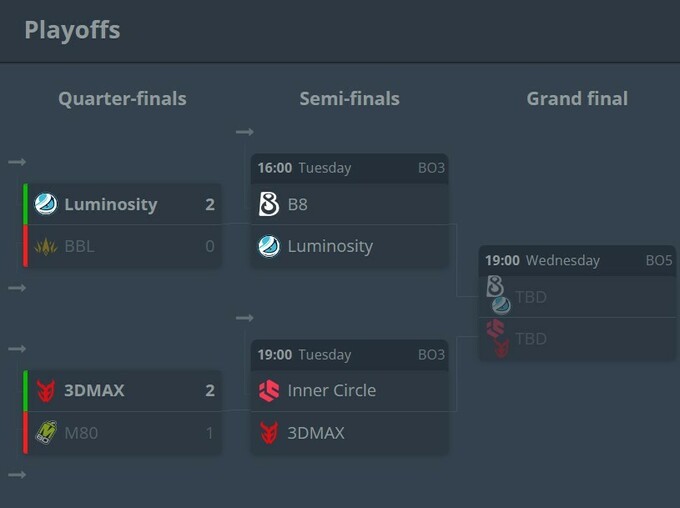
The Ukrainian teams B8 and Inner Circle advanced directly to the next stage after finishing first in their respective groups. They learned who their opponents would be following the quarterfinal matches: Luminosity defeated BBL 2-0, while 3DMAX advanced by beating M80 2-1.

The Ukrainian teams had already faced these opponents in the group stage, and in both cases, our teams came out on top. Back then, B8 defeated Luminosity 13–11 on Dust2 in a BO1 match, while Inner Circle beat 3DMAX 13–9 on Nuke.

The semifinal matches will take place on Tuesday, September 22, in a BO3 format. At 3:00 p.m., B8 and Luminosity will kick off their match, followed by Inner Circle vs. 3DMAX at 6:00 p.m. The winners of these matchups will face off in the grand final on September 23, where they will compete for the title in a BO5 series.
233640.jpg

Відповідей поки що немає.
Гість
Напишіть відповідь...

Акаунт

Навігація

Пошук

Пошук

Configure browser push notifications

Chrome (Android)
  1. Tap the lock icon next to the address bar.
  2. Tap Permissions → Notifications.
  3. Adjust your preference.
Chrome (Desktop)
  1. Click the padlock icon in the address bar.
  2. Select Site settings.
  3. Find Notifications and adjust your preference.