
Перейти до змісту
View in the app

A better way to browse. Learn more.

Файна Україна

A full-screen app on your home screen with push notifications, badges and more.

To install this app on iOS and iPadOS
  1. Tap the Share icon in Safari
  2. Scroll the menu and tap Add to Home Screen.
  3. Tap Add in the top-right corner.
To install this app on Android
  1. Tap the 3-dot menu (⋮) in the top-right corner of the browser.
  2. Tap Add to Home screen or Install app.
  3. Confirm by tapping Install.

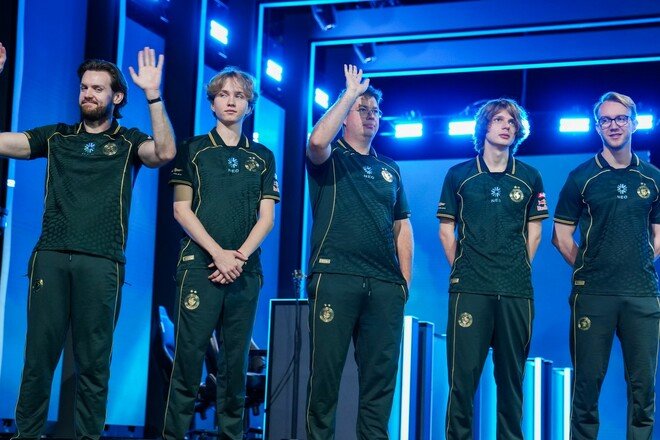
Six tournaments without a finals appearance: the Falcons' rough stretch following the major
📅 04.11.2026 22:58⏱ 1 хв читання
Ciko Перегляди: 40 Відповіді: 0
Six tournaments without a finals appearance: the Falcons' rough stretch following the major
Найкращим результатом команди стало 3-4 місце на BLAST Open

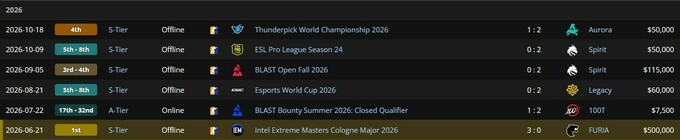
After winning the IEM Cologne Major 2026, the Falcons' results in subsequent tournaments were significantly more modest. Over the course of six competitions, the team never made it to the grand final, and its best finish was a 3rd-4th place finish at the BLAST Open Fall 2026.

After the Major, the Falcons finished 5th–8th at the Esports World Cup 2026 and ESL Pro League Season 24, fourth place at the ThunderPick World Championship 2026, and 7th–8th place at IEM Beijing 2026, where they were eliminated by NAVI in the group stage.

Their most disappointing performance came at BLAST Bounty, where the team finished in 17th–32nd place, failing to qualify for the Main Event.

The result of their last six tournaments since their triumph in Cologne: not a single final and not a single new trophy. For a team that won the season’s most prestigious tournament, this is a major setback.
242314.jpg

Відповідей поки що немає.
Гість
Напишіть відповідь...

Powered by Invision Community
Invision Community Support forums

Акаунт

Навігація

Пошук

Пошук

Configure browser push notifications

Chrome (Android)
  1. Tap the lock icon next to the address bar.
  2. Tap Permissions → Notifications.
  3. Adjust your preference.
Chrome (Desktop)
  1. Click the padlock icon in the address bar.
  2. Select Site settings.
  3. Find Notifications and adjust your preference.