Перейти до змісту
View in the app

A better way to browse. Learn more.

Файна Україна

A full-screen app on your home screen with push notifications, badges and more.

To install this app on iOS and iPadOS
  1. Tap the Share icon in Safari
  2. Scroll the menu and tap Add to Home Screen.
  3. Tap Add in the top-right corner.
To install this app on Android
  1. Tap the 3-dot menu (⋮) in the top-right corner of the browser.
  2. Tap Add to Home screen or Install app.
  3. Confirm by tapping Install.

European Volleyball Championship Playoff Bracket. All Round of 16 Matchups Have Been Determined
📅 18.09.2026 05:12⏱ 1 хв читання
Ciko Перегляди: 23 Відповіді: 0
European Volleyball Championship Playoff Bracket. All Round of 16 Matchups Have Been Determined
Завершився груповий етап континентальної першості

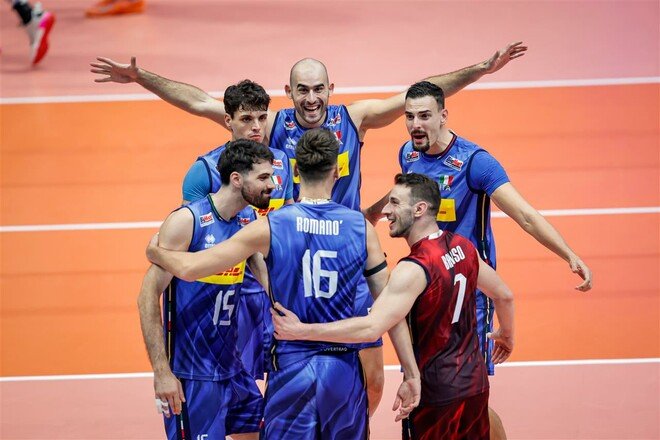
The group stage of the 2026 Men’s European Volleyball Championship has concluded. As a result, all 16 playoff participants have been determined, and the round of 16 matchups have been set.

The Ukrainian national team finished the group stage in second place in Group B with 12 points. Raul Lozano’s team won four of their five matches—against Israel (3–1), North Macedonia (3–0), Bulgaria (3–1), and Portugal (3–0). In the final round, Ukraine lost to Poland, 0–3.

The main drama of the final day of the group stage centered on Groups A and C, where the teams’ final standings—and, consequently, their opponents in the Round of 16—were determined.

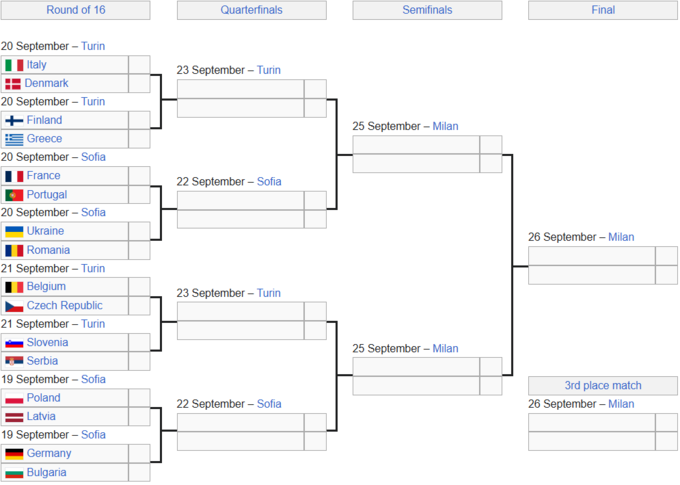
Round of 16 matchups:

  • Italy vs. Denmark

  • Finland vs. Greece

  • France vs. Portugal

  • Ukraine vs. Romania

  • Belgium vs. Czech Republic

  • Slovenia vs. Serbia

  • Poland – Latvia

  • Germany vs. Bulgaria

Quarterfinals:

  • Italy vs. Denmark / Finland vs. Greece

  • France vs. Portugal / Ukraine vs. Romania

  • Belgium – Czech Republic / Slovenia – Serbia

  • Poland vs. Latvia / Germany vs. Bulgaria
233302.png

Відповідей поки що немає.
Гість
Напишіть відповідь...

Акаунт

Навігація

Пошук

Пошук

Configure browser push notifications

Chrome (Android)
  1. Tap the lock icon next to the address bar.
  2. Tap Permissions → Notifications.
  3. Adjust your preference.
Chrome (Desktop)
  1. Click the padlock icon in the address bar.
  2. Select Site settings.
  3. Find Notifications and adjust your preference.