
4 aces by Plotnytskyi. Perugia crushed its opponent on its home court

In an Italian Super League match, the Perugia volleyball team secured a convincing 3-0 victory over Cisterna on their home court. Ukrainian volleyball player Oleg Plotnytskyi plays for the Umbrian team.
The home team controlled the match throughout all three sets. In the first set, the visitors put up a fight but ultimately fell short in the closing stages (25–22). In the next two sets, Perugia completely dominated, winning decisively 25–17 and 25–15.
Oleg Plotnytskyi contributed to the winning team’s success, scoring 9 points (3 in attack, 2 on blocks, and 4 aces).
The top scorer of the match was the home team’s opposite hitter, Ferre Reggers, who scored 17 points (all on attacks). Kamil Semenyuk also stood out for Perugia with 12 points. In Chistern, Giulio Magalini scored 12 points.
Perugia: Gadzini, Enno, Giannelli, Reggers (17), Loser, Cappadano, Loreti, Sole, Collator (1), Semenyuk (12), Plotnytskyi (9), Sanginetti (6), Hosseini Toluti, Crozato (7).
Cisterna: Sabo, Magalini (12), Maliano, Pen Shikun (6), Barotto (7), Wrobel, Lanza (5), Fanizza (1), Pierri, Martínez Palacios, Mazzone (4), Duflos Rossi (4), Tosti, Federici.
Super League. Men. Perugia
Perugia – Cisterna – 3:0 (25:22, 25:17, 25:15)
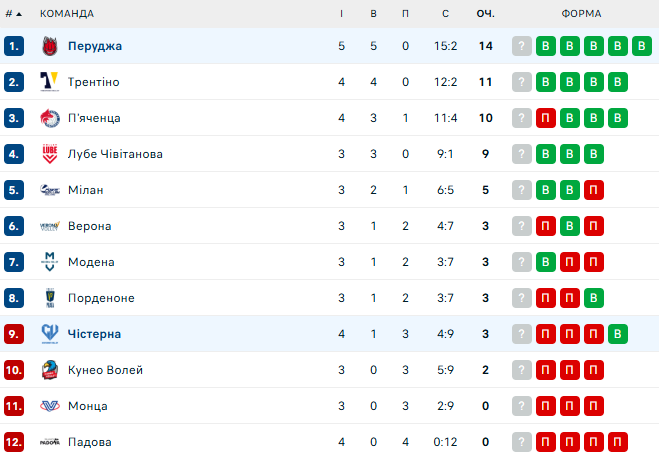
Standings:
Відповіді